Netiquette
Here is a quick round-up of these 10 netiquette rules:
- Before posting your question to a discussion board, check if anyone has asked it already and received a reply.
- Stay on topic. Don’t post irrelevant links, comments, thoughts or pictures.
- Don’t type in ALL CAPS! If you do it will look like you are screaming.
- Don’t write anything that sounds angry or sarcastic even as a joke, because without hearing your tone of voice, your peers might not realize you’re joking.
- Always remember to say”please” and “thank you” when soliciting help from your classmates.
- Respect the opinion of your classmates. If you feel the need to disagree, do so respectfully and acknowledge the valid points in your classmate’s argument. If you reply to a question from a classmate, make sure your answer is accurate!
- If you ask questions, many people respond. Summarize all answers and post that summary to benefit your whole class.
- Be brief. If you write a long dissertation in response to a simple question, it’s unlikely that anyone will spend the time to read through it all.
- Don’t badmouth others or call them stupid. You may disagree with their ideas but don’t mock the person.
- If you refer to something your classmate said earlier in the discussion, quote just a few key lines from their post so that others won’t have to go back and figure out which post you’re referring to.
Info. Architecture 2
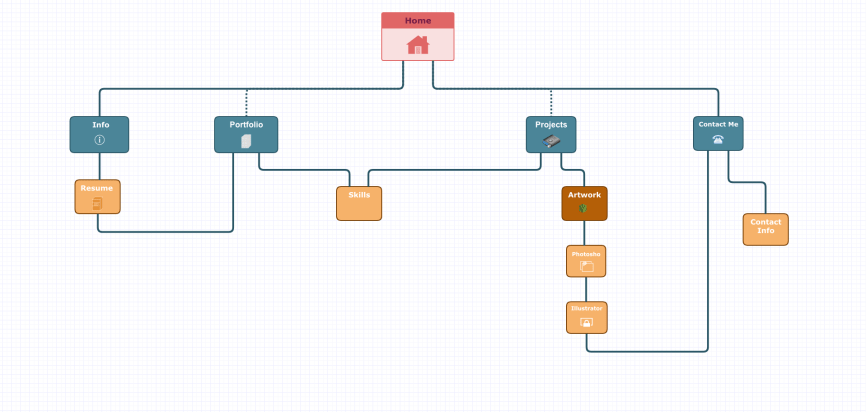
A website wireframe, also known as a page schematic or screen blueprint, is a visual guide that represents the skeletal framework of a website. Wireframes are created for the purpose of arranging elements to best accomplish a particular purpose. The purpose is usually being informed by a business objective and a creative idea. The wireframe depicts the page layout or arrangement of the website’s content, including interface elements and navigational systems, and how they work together. The wireframe usually lacks typographic style, color, or graphics, since the main focus lies in functionality, behavior, and priority of content. In other words, it focuses on what a screen does, not what it looks like. Wireframes can be pencil drawings or sketches on a whiteboard, or they can be produced by means of a broad array of free or commercial software applications. Wireframes are generally created by business analysts, user experience designers, developers, visual designers, and by those with expertise in interaction design, information architecture and user research.
Standard Web Conventions
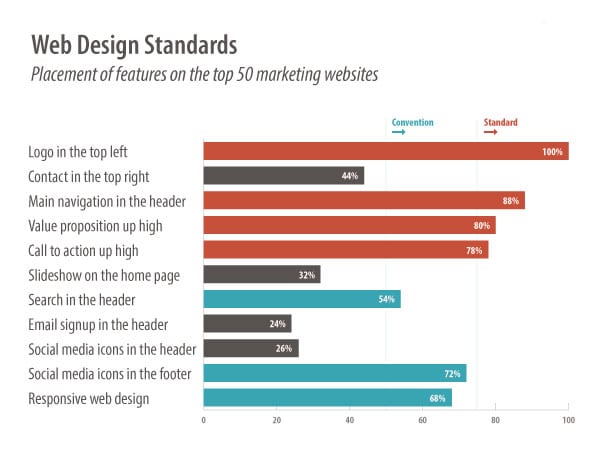
Conventions that get utilized frequently and become familiar to users are known as standard conventions. Some people think standard conventions have to look the same, but I think they just have to utilize the same mental model. This is where a lot of UX professionals, and their clients, get tripped-up.
UX professionals tend to rely on established conventions in order to help users through an experience. Users that are dumped into a website will be looking for familiar elements to interact with. If users get confused during an experience, they will look for standard conventions for guidance. Users often have to understand many different elements and how they work together quickly. If a user isn’t able to understand the conventions used within a couple seconds, statistics show they’re likely to leave.


Web Design Standards
“Standard web conventions” are web design standards and best practices. They’re a set of rules that web designers follow, knowing that they align with visitors’ expectations. They are guidelines for clarity and usability.
Scripting Languages
When you need to order a computer around at the hardware level, nothing beats a good programming language. Sometimes, though, you just need to make something happen and you don’t care how many layers come between your command and the computer’s response. When that’s the case, a scripting language can be your best friend.
Scripting languages aren’t new. They’ve been around since the glory days of the mainframe. Even then, they made things happen by bossing other software around. It might have been the operating system, a job loader, or another application, but the result was the same — a set of operations completed to produce the desired results.
The nine scripting languages here are most similar in their importance and familiarity. Each is likely to have special significance for a different group of IT professionals, the differences showing up in the systems used (and sometimes in the era when a professional learned his or her profession.)
For example, if you have distinct memories of keeping decks of JCL punched cards wrapped by rubber bands in your Samsonite briefcase, then you’ve just established the age during which you learned to code. (My briefcase, by the way, was the thinner, light-brown model, and I kept my JCL decks close to my green IBM flow-chart template. Get off my lawn.)
Scripting languages have proven their utility by sticking around. Javascript and PHP are heavily used today, and you’ll be hard-pressed to find a working Unix admin who doesn’t have a stash of Bash scripts at her or his disposal.
Let’s take a look at these languages and the times when they might be useful — if for nothing more than sparking nostalgic conversation.

 Amanpreet.stuff